Sygic GPS Navigation & Maps
Sygic.Travel & Local
4.239.09K Reviews
- Version
- Varies With Device
- Installs
- 50.00M
- Age Rating
- Everyone
Screenshots
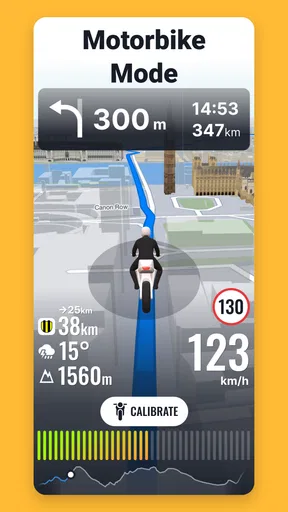
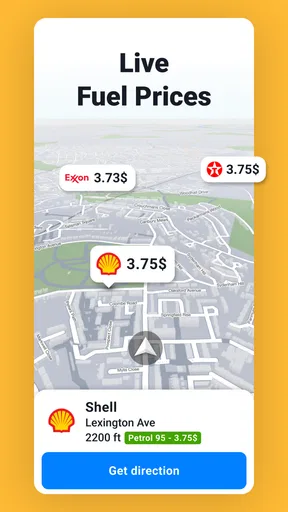
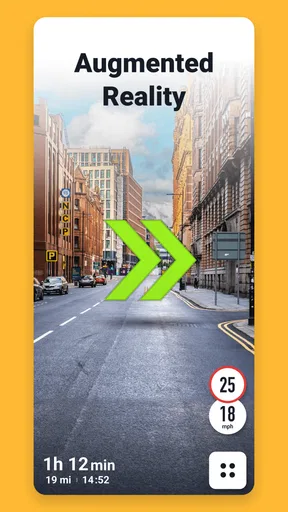
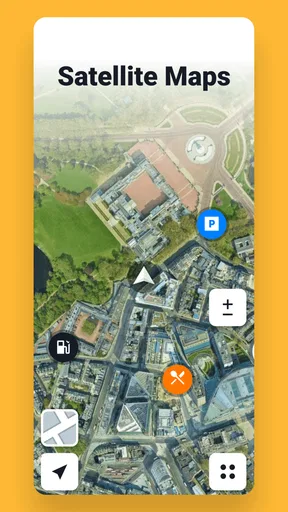
Our Review of Sygic GPS Navigation & Maps
 Analysis by Appyee
I judge a navigation app less by how impressive its feature list sounds than by whether I can trust it when I am tired, out of mobile coverage, or trying to make an unfamiliar turn without taking my eyes off the road. Sygic GPS Navigation & Maps is built around that kind of driving: it combines maps that can be used offline with guidance intended for everyday trips and longer journeys. That makes it worth considering if you want a dedicated route planner rather than relying entirely on a phone’s data connection.
Start with the kind of driving you do
The key decision is whether you need directions mainly in places where your connection is dependable, or whether you want maps already stored on your phone. Offline navigation can be especially useful on a holiday drive through rural areas, when roaming data is costly, or when a tunnel or patchy signal interrupts a route. It is not a substitute for planning: I would download the regions I need before setting off and check that there is enough room on my phone.
There is also a practical difference between choosing a navigation app for occasional errands and choosing one for a full day behind the wheel. For a short local trip, a familiar maps app may be all you need. For a route with several stops or a stretch where connectivity is uncertain, Sygic’s offline maps and trip-planning tools give it a clearer purpose. I would decide based on those needs, not on the assumption that every extra feature will matter on every drive.
What the offline approach changes
Offline maps are most helpful when you prepare at home or somewhere with reliable internet, rather than waiting until you are already on the road. I would download the areas around both the destination and the route, then open the app before departure to make sure the map is available. That small routine reduces the risk of discovering a gap in coverage at the exact moment you need a turn. It also makes this app a sensible option for travelers who prefer not to depend on continuous mobile data for basic navigation.
Offline does not mean every connected feature should be assumed to work in the same way without a connection. A locally stored map can still help with the road layout, while services that depend on current information may be less useful when the phone is disconnected. I treat offline navigation as a reliable fallback for finding the route, not a promise that every live detail will remain current. Keeping that distinction in mind makes the app’s strongest use case clearer.
First Impressions
From the moment I opened Sygic GPS Navigation & Maps, I was impressed by its clean and intuitive interface. The app is available for both Android and iOS, and getting it installed was a breeze. With a few taps, I was ready to explore its features. Sygic is a free Travel & Local app from developer Sygic, and its broad audience is reflected in an average rating of 4.2 from around 1.9 million ratings, alongside more than 50 million installs. It is rated for Everyone, though optional in-app purchases range from $0.99 to $89.99 per item, so I would check which capabilities are included before deciding to buy anything.
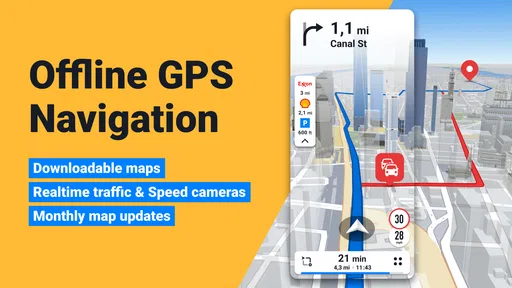
The first thing that caught my eye was the app’s ability to download maps for offline use. This is a lifesaver if you’re traveling through areas with spotty data coverage. The download process was fast, and I was able to select maps for the regions I needed without any hassle. One useful habit is to plan downloads around the actual trip rather than collecting maps you might never open: it keeps preparation focused and helps you think through which regions you will cross, not just where you will stop.
Exploring the Features
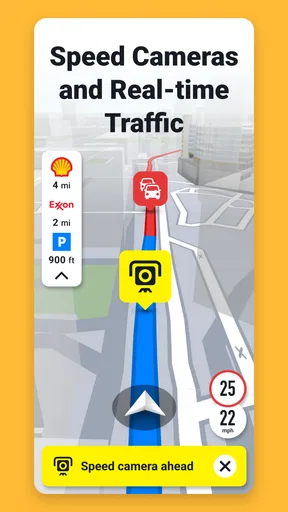
Let’s dive into the features that make Sygic stand out. One of the highlights is its real-time traffic information. The app uses data from millions of drivers to provide up-to-the-minute traffic updates. I found this particularly useful during rush hour, as it managed to reroute me efficiently, saving me both time and stress. Traffic guidance is most valuable when I can act on it safely: I prefer to review a suggested change at a natural pause rather than react abruptly to a new route while negotiating a busy junction.
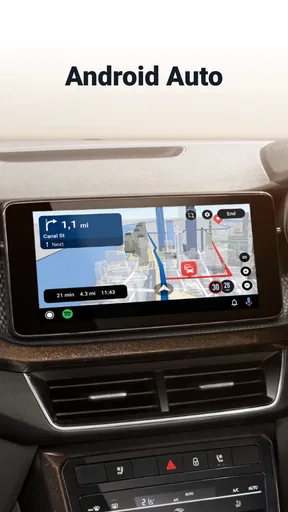
Another cool feature is the speed limit alerts. It’s easy to lose track of speed when you’re on unfamiliar roads, but Sygic has got your back with its handy reminders. The app also integrates seamlessly with your car’s dashboard, so you can keep your eyes on the road while it whispers directions in your ear. Android Auto compatibility is a useful fit for drivers whose cars support that system, because it lets navigation sit in the dashboard environment instead of requiring constant attention to the phone. I would still set the route and volume before moving, then treat any alert as a prompt to check the road and signs, not as a replacement for them.
If you’re a fan of planning your trips down to the last detail, you’ll love the trip planning feature. I was able to set multiple waypoints, which is great for long road trips with several stops. Plus, the app provides estimated travel times, helping you plan your day more effectively. A good way to use waypoints is to enter the stops that genuinely shape the day—such as a planned break or a pickup—rather than every minor possibility. That keeps the route readable and leaves room to adjust if plans change.
User Experience
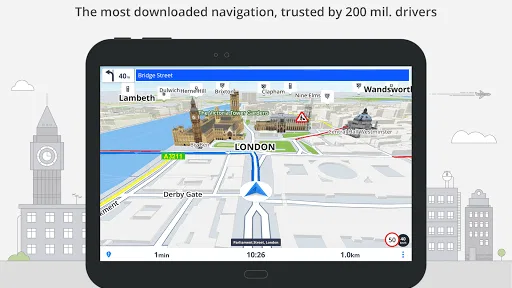
Using Sygic was a smooth experience. The voice navigation is clear, and the directions are precise. I appreciated the 3D maps, which offered a more realistic view of the surroundings. It felt like I was navigating the streets with a personal guide by my side. A 3D view can make a complicated area easier to interpret, but it is still worth listening for the spoken instruction and checking real road signs, especially where lanes split or road layouts change.
The app also supports augmented reality navigation, which is a fun and futuristic way to find your way around. It overlays directions on your phone’s camera view, making it incredibly easy to follow the path. I see this as a situational aid rather than something I would leave running throughout a drive. A camera view is most useful when I am stopped and orienting myself in a confusing place; using a phone while driving still calls for a safe mount and attention on the road, not prolonged interaction with the screen.
Points of Interest
Sygic also excels in helping you find points of interest. Whether you’re looking for a gas station, restaurant, or hotel, the app provides comprehensive listings and reviews. I stumbled upon some amazing local eateries thanks to its suggestions, turning my mundane drive into a culinary adventure. For a practical trip, I would search for a stop before I reach the point where fuel or food becomes urgent. That gives me time to compare nearby choices and avoid making a rushed decision at the roadside.
There is a trade-off between using an in-app place search and a general-purpose maps service. Sygic keeps navigation and route planning in one driving-focused place, while a broader map app may suit someone who spends more time browsing local businesses, checking familiar saved places, or planning outings on foot. I would not switch solely for points of interest if my current app already handles those searches well; the stronger reason to try Sygic is the combination of offline maps and driving tools.
Safety Features
Safety is a top priority, and Sygic doesn’t skimp on this aspect. The app includes features like head-up display (HUD), which projects navigation information onto your windshield. It’s a nifty feature that allows you to stay focused on the road without missing any directions. The usefulness of a HUD depends on whether its display is clear in the car and conditions where it is used. I would test it while parked first and turn it off if it distracts or is difficult to read.
There’s also a dashcam function that records your journey. Not only does it capture beautiful scenic drives, but it also provides evidence in case of an accident, which is a comforting thought for any driver. I would treat recording as a supplementary convenience, not as a guaranteed substitute for a dedicated camera or a reason to handle the phone while moving. Before relying on it, it makes sense to check the app’s settings and storage needs, then keep the phone secured where it cannot interfere with driving.
When another navigation choice makes more sense
If you mostly travel in a familiar city with a strong connection and want a simple route from one address to another, the navigation app already on your phone may be quicker to open and perfectly adequate. Someone who depends heavily on live local discovery may also prefer a general map service they already use for saved locations and business searches. I would not add another app just because it has more options; the extra setup is worthwhile only if its offline maps, driving presentation, or multi-stop planning solve a real problem for you.
On the other hand, drivers who cross areas with unreliable coverage, plan road trips in advance, or want navigation visible through Android Auto have a more concrete reason to try Sygic. It is also a reasonable choice if you like having route planning, map downloads, and driving-oriented aids together. The important question is whether those tools fit your routine, since extra settings and optional purchases can make a more feature-rich app feel like unnecessary work for someone who only needs occasional directions.
What to expect before switching
Moving to a new navigation app takes more than installing it. I would first download the maps for regular routes, learn where the voice and display controls are, and try a short familiar journey before trusting it on a long unfamiliar one. That test is a low-stress way to see whether the instructions suit your driving style and whether the dashboard connection works comfortably in your car. It also helps you identify what you actually use, instead of paying for an optional feature before you know whether it matters.
Cost deserves a quick check as well. The app is free to install, but it offers in-app purchases, with listed items ranging from $0.99 to $89.99. That wide span means I would look at the particular purchase and its terms inside the app rather than assume every feature is included or that one purchase covers everything I want. If the free experience already meets your needs, there is no reason to buy more; if a paid capability is central to your decision, confirm what it unlocks before committing.
A common practical question is whether offline maps make a trip fully independent of mobile coverage. They make the stored map useful without a continuous connection, which is the main benefit, but I would prepare in advance and avoid assuming every current traffic or search detail will be available offline. Another question is whether it suits a daily commute: it can, especially if you value traffic guidance or dashboard navigation, but a simpler app may be less effort if your route rarely changes and you do not need downloaded maps.
Conclusion: Worth the Download?
After spending some quality time with Sygic GPS Navigation & Maps, I can confidently say it's a must-have app for any traveler or daily commuter. It combines usability with a rich set of features that cater to both casual drivers and road trip enthusiasts. I would put that recommendation more narrowly: it is a strong candidate for drivers who will use offline maps, multi-stop planning, or its car-focused guidance, rather than an automatic upgrade for every phone owner.
In a world filled with navigation apps, Sygic stands out thanks to its reliability, detailed offline maps, and real-time traffic updates. So, if you’re looking to upgrade your navigation experience, give Sygic a try. It’s just a download away from transforming your journeys. My advice is to test it on a familiar route, prepare the maps before a trip, and decide after that whether its particular mix of features earns a place in your daily routine.
Verdict
Strengths of Sygic GPS Navigation & Maps
- Offline maps available worldwide.
- Real-time traffic updates.,3D maps for better orientation.
- Voice-guided navigation.
- Customizable routes and waypoints.
Limitations of Sygic GPS Navigation & Maps
- Requires large storage space.
- Some features require a subscription.
- Occasional map loading delays.
- Battery consumption is high.
- Limited free features.
Other Releases by Sygic.
View All
Fuelio: gas log & gas prices
Auto & Vehicles4.2

Sygic GPS Truck & Caravan
Maps & Navigation3.6
Similar Picks in This Category
View All
Google Maps
Google LLC3.4

Google Maps Go
Google LLC4.1

Booking.com: Hotels & Travel
Booking.com Hotels & Vacation Rentals4.8

Google Earth
Google LLC3.8

Skyscanner Flights Hotels Cars
Skyscanner Ltd4.8

trivago: Compare hotel prices
trivago N.V.4.4
Frequently Asked Questions
What features does Sygic GPS Navigation & Maps offer for driving?
Sygic GPS Navigation & Maps provides a comprehensive suite of features for drivers, including real-time traffic updates, speed limit warnings, offline maps, lane guidance, and voice navigation. The app also offers advanced safety features such as head-up display (HUD) and dashcam functionality, making it a robust choice for both casual drivers and frequent travelers.
Is Sygic GPS Navigation & Maps available offline?
Yes, Sygic GPS Navigation & Maps allows users to download maps for offline use. This feature is particularly useful for travelers who may not always have access to reliable internet connections. Users can download maps for entire countries or specific regions, ensuring they have navigation capabilities even in remote areas.
How accurate is the real-time traffic information provided by Sygic?
Sygic utilizes data from multiple sources to deliver highly accurate real-time traffic information. This includes data from millions of users and partnerships with global traffic providers. The app helps users avoid traffic jams and find the fastest routes by providing up-to-date traffic conditions and suggesting alternative paths.
Are there any subscription fees for using Sygic GPS Navigation & Maps?
Sygic GPS Navigation & Maps offers a free version with basic features, but accessing premium features requires a subscription. The premium version includes advanced features like offline maps, real-time traffic updates, and head-up display. Subscription plans are flexible, allowing users to choose between monthly, yearly, or one-time lifetime payments.
What languages does Sygic GPS Navigation & Maps support for voice navigation?
Sygic GPS Navigation & Maps supports a wide range of languages for voice navigation, making it accessible to a global user base. Popular languages include English, Spanish, French, German, and more. Users can select their preferred language in the app settings, ensuring clear and understandable directions while driving.
